

Canvas LMS
Incomplete Requests
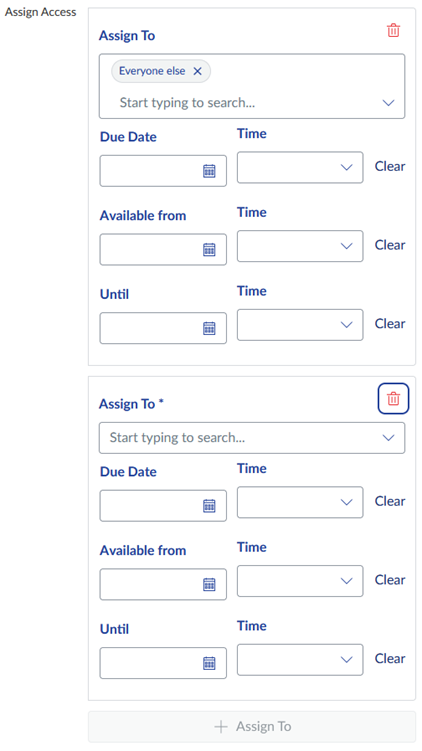
An instructor can grant a grade of Incomplete “I” to a student(s) in a course. An Incomplete can be managed inside the original course in Canvas by creating a special section where the student and original instructor will be granted access. This gives the student and instructor access to the content, their grades, assignments and activities. This eliminates the instructor’s and student’s need to re-do any work. The instructor can adjust due dates accordingly. In the Assign to area, instructors can select the student’s name or by selecting the ‘Incomplete’ section.
The instructor enters an “I” in Banner.
The instructor submits a help desk ticket for an Incomplete access. Include the following information for a faster turnaround:
- Student name (Jane Doe)
- Student’s 97#
- Original course name (202610-ACCT-210-01-14417-Financial Accounting)
- Original instructor’s 97#
A new section is created in the original Canvas course called “Incomplete- 202610-ACCT-210-01-14417-Financial Accounting” and those needing access will be enrolled This new incomplete course section will automatically close at the end of the 8-week period as set on the academic calendar.
The instructor changes the due dates on any applicable activities for the student(s).
- Click on any assignment/quiz/etc.
- Click edit
- Scroll all the way to bottom
- Click “+Assign to”
- Type or Select the student’s name or the incomplete section (Incomplete- 202610-ACCT-210-01-14417-Financial Accounting)
- Select new due date (and possibly until date)
- Save
Please Note:
A student may temporarily receive a grade of Incomplete “I” and has 8 weeks to complete the required materials to receive a grade. The grade of “I” in a course does not allow for a student to be placed in another Canvas course.
If the original instructor is not working this term or is longer employed at ECSU, then a new instructor of the course will be enrolled in the original Canvas course along with the student. In rare cases, the student can be enrolled as observer in the current term’s course; however, the observer role does not allow the student to participate in the current course and will need to make arrangements with the instructor outside of Canvas to submit their work.