

Canvas LMS
Integrations
Learning Management System (LMS) integrations are the external software tools through which platforms like Canvas offer additional instructional functionality and share verifiable personal data about LMS users with external software vendors, such as Zoom or Microsoft’s OneDrive (Microsoft Education).
If you do not see the LMS integration you are looking for, please submit an IT Help Desk ticket.
The Request Process
Step 1
Start by consulting with Academic Affairs. There you can discuss your needs/suggestion. There might already be a solution on campus.
Step 2
Gather as much of the necessary information for the integration request:
- Product Name
- Vendor Point of Contact, Website, Email Address, and Phone Number
- A description of the tool and its use
- Number of users impacted
- Desired implementation semester
- Integrations are only installed between terms
- Is there a need for student licenses to be purchased individually
- The funding source
Step 3
Submit a request through the Help Desk.
The Approval Process
After the request is received the Department of Information Technology will begin the coordination of the process:
Workflow
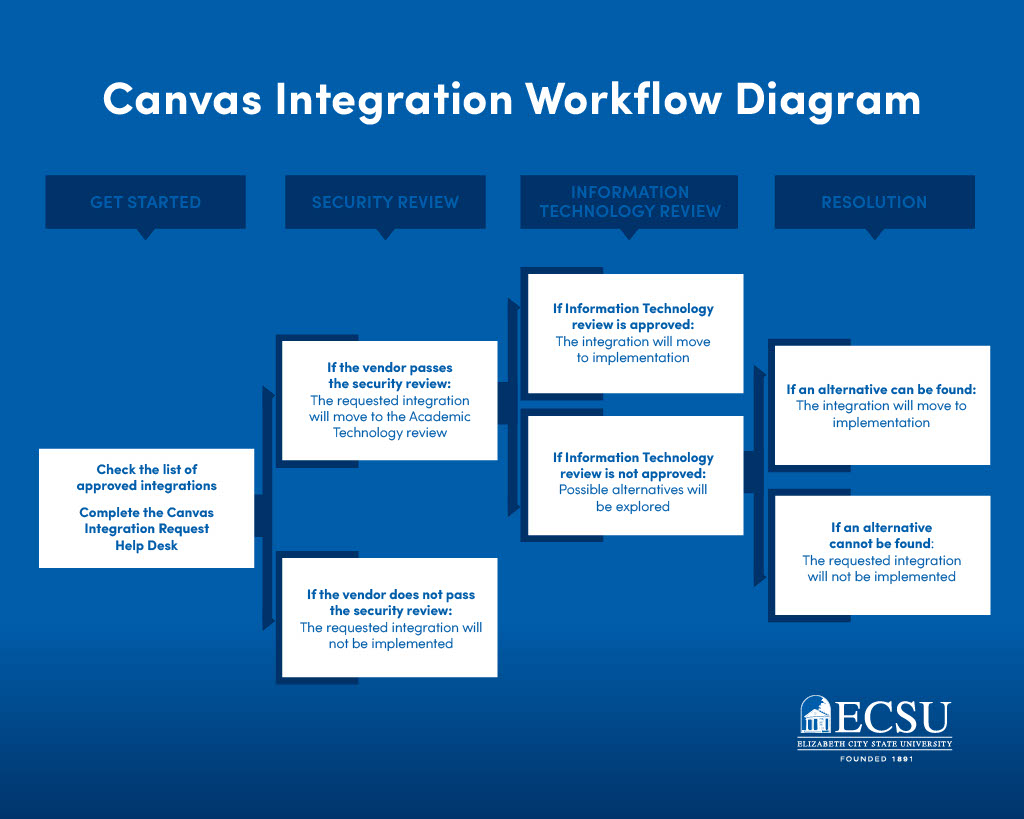
How long can I expect this review to take?
The full process can take 3 to 4 weeks from the initial request. This also allows additional departments time for a detailed evaluation if necessary. Following the full review process, the integration will be scheduled for deployment within the production environment between terms.
Current Integration Availability:
|
Integration Tool |
Description |
|
Pearson Access is our comprehensive, cloud-based management system for large-scale assessments. Pearson Access integrates multiple products and services to configure a comprehensive assessment solution. |
|
|
Aktiv Chemistry reimagines chemistry courses with an innovative approach that fosters student engagement both during and after class – in-person or online. |
|
|
“Roll call” is a built-in tool that allows instructors to take attendance, which automatically generates a 100-point assignment in the Gradebook. It supports both list and seating chart views to mark students as present, absent, or tardy. |
|
|
“Course Materials” is an unprecedented selection of low-cost used, rental, and digital course materials. Over 7000 publishers to offer your faculty selections. You can place your books online here allowing quick access for your students. |
|
|
Interact between teachers and students in real time |
|
|
Commons is a learning object repository that enables educators to find, import, and share resources. A digital library full of educational content, Commons allows Canvas users to share learning resources with other users as well as import learning resources into a Canvas course. |
|
|
Publisher materials |
|
|
Boost response rates and turn insights into meaningful improvements with our award-winning course evaluations & survey software. All courses are evaluated at the end of the term. |
|
|
Grammarly’s integration with Canvas allows students to evaluate their written assignments for essential correctness, clarity, engagement, and delivery quality before submitting them. This provides students an opportunity to improve their work before turning it in. Additionally, faculty can view Grammarly’s writing score for each submission, which offers an initial insight into the work’s readability. |
|
|
Hawkes Learning LTIA |
Built on the principles of mastery learning, the innovative Hawkes Learning platform gives students the tools and support they need to close gaps, accelerate learning, and develop the skills that lead to lasting success. |
|
The integration of Lucid (Lucidchart and Lucidspark) with the Canvas provides educators and students with free access to the full Lucid Education Suite. This partnership enhances virtual learning through visual collaboration tools, including brainstorming whiteboards (Lucidspark) and diagramming tools (Lucidchart). |
|
|
Macmillan LTI Advantage Content Macmillan LTI Advantage Course Tools |
Publisher Content The Macmillan integration, allows instructors to bring Achieve and other digital content directly into our LMS. This integration enables single sign-on (SSO), gradebook synchronization, and seamless access to interactive educational resources. |
|
Publisher content Organize assignments, sync with a Learning Management System (LMS), access instructor resources, and more! |
|
|
SIMnet® is a leading training and assessment platform for developing students’ skills in Microsoft Excel, Word, Access, PowerPoint, and Outlook! In addition to Microsoft Office, SIMnet also boosts students’ skills in generative AI, computer concepts, file management, and operating systems. |
|
|
Microsoft Education |
Microsoft OneDrive |
|
Publisher Content Oxford Learning provides access to resources for Oxford University Press textbooks. Enhance your students’ learning with quizzes, practice exams, and media exercises. |
|
|
A social learning platform for annotating text, video, and audio content – motivating students to ask questions, share insights, and build a learning community. |
|
|
Tutoring services 24/7 anywhere, students can text, call, or video chat. Insights and actional data for instructors. |
|
|
Tutoring services |
|
|
Search or link in youtube videos. |
|
|
YuJa Verity Ensure exam integrity with test proctoring software that enables automated proctoring integrated directly within Canvas. |
|
|
The LTI Pro app integrates Zoom Video Conferencing into our LMS. Instructors can use the LTI Pro app to schedule and start Zoom meetings, to support distance learning, office hours, study groups and lecture capture, access their cloud recordings Students can use LTI Pro to join Zoom meetings to remotely attend classes, office hours and study groups, view recordings of previous classes |